


How to Find Your WEEX Wallet Address: Deposit Address Guide
Your WEEX wallet address, also known as a deposit address, is the address you use when transferring cryptocurrency from an external wallet or another exchange to your WEEX account.
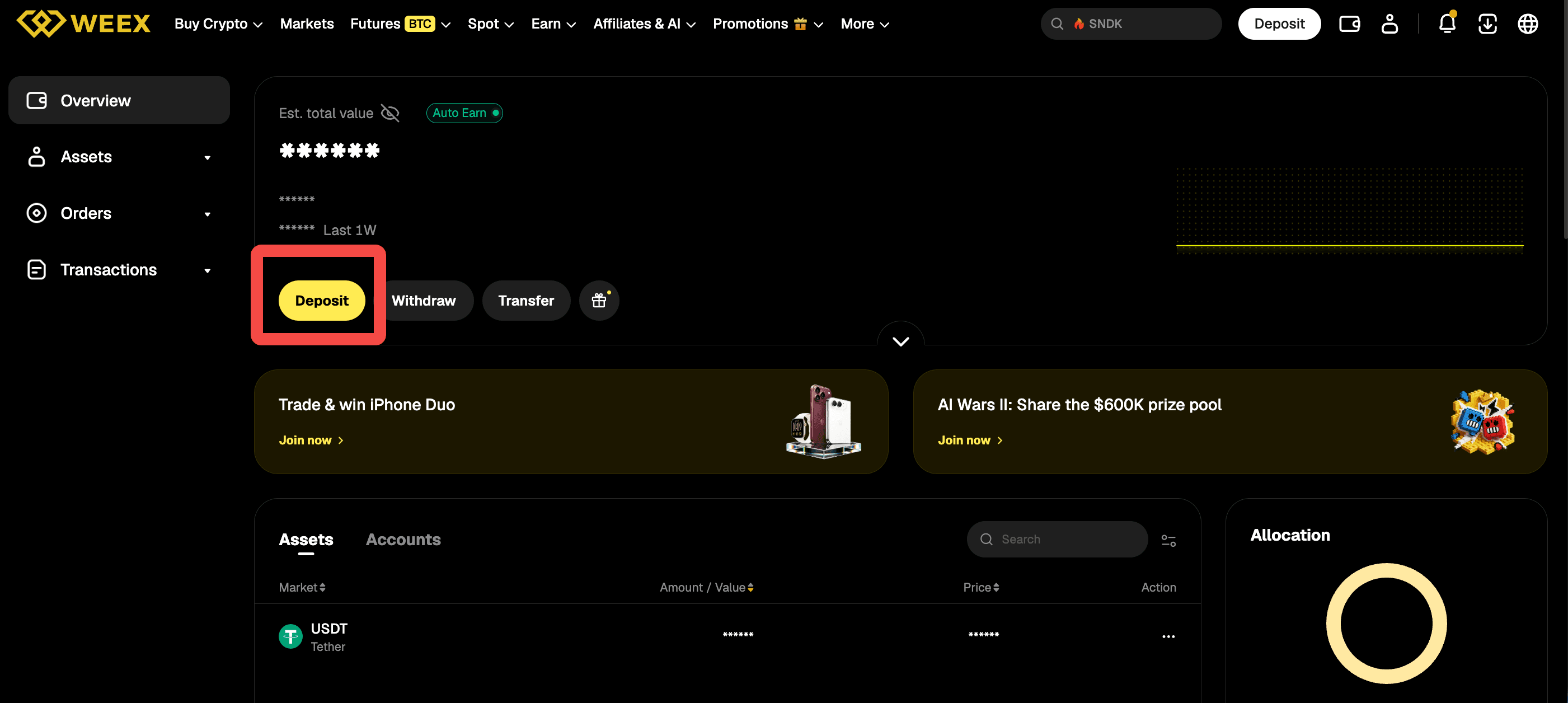
To find your WEEX wallet address, log in to WEEX and go to Assets → Deposit. Select the cryptocurrency and blockchain network you want to use, and WEEX will display the corresponding deposit address. You can copy the address or scan the QR code to make a deposit.
Because the correct WEEX deposit address can depend on both the cryptocurrency and network you select, always check the latest address shown on the official WEEX deposit page before transferring funds.
How to Find Your WEEX Wallet Address
You can find your WEEX wallet address from the deposit section of your account.
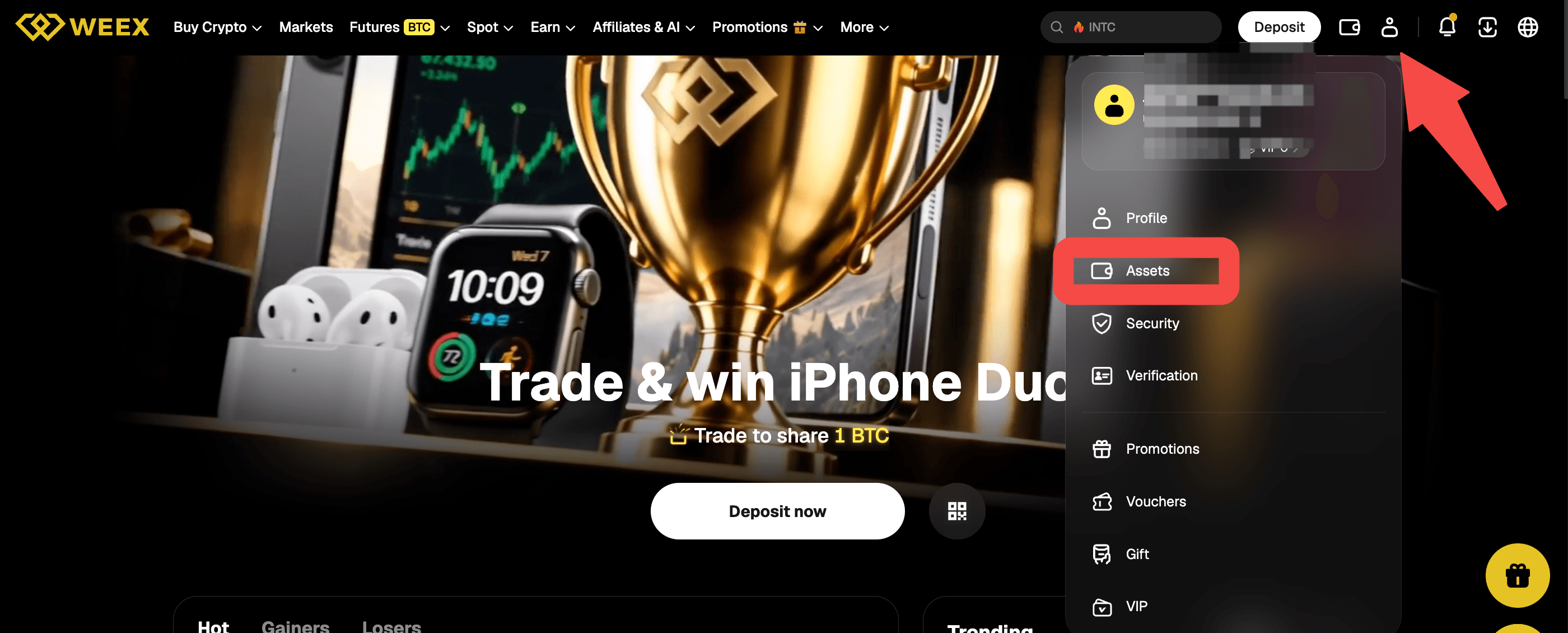
First, log in to the WEEX app or website. Go to Assets → Deposit. Select the cryptocurrency you want to deposit and then choose the correct blockchain network.
After you confirm the token and network, WEEX will display the deposit address you need for the transfer. You can copy the address and paste it into the sending wallet or exchange. Alternatively, you can scan the QR code provided on the deposit page.
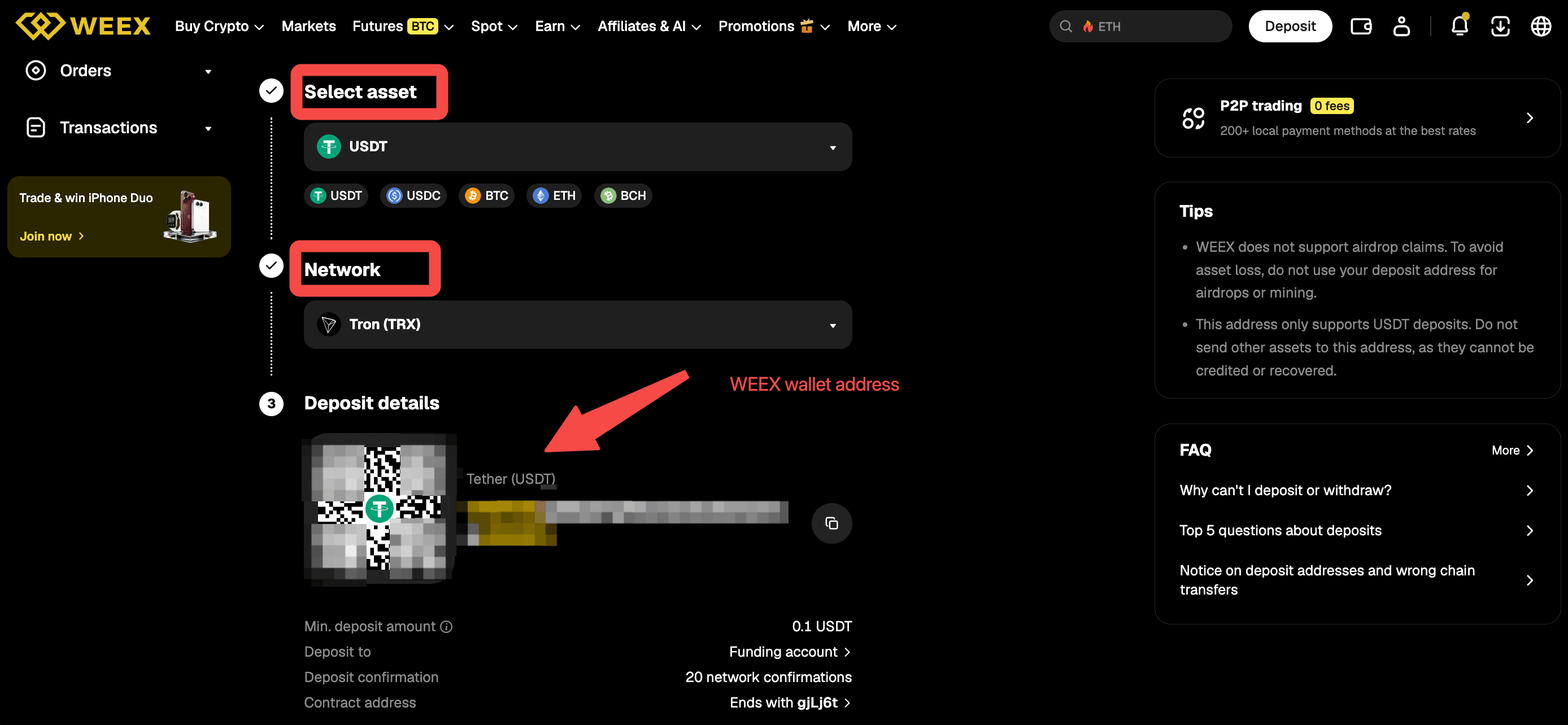
The basic process is: Assets → Deposit → → Select Asset → Select Network → Copy Deposit Address or Scan QR Code
Before sending your crypto, check that the token, network and deposit address all match the information displayed on WEEX.
Why Does the Network Matter for Your WEEX Deposit Address?
Selecting the correct network is one of the most important parts of finding and using a WEEX deposit address.
Some cryptocurrencies are available on multiple blockchain networks. For example, USDT can be transferred through different networks supported by WEEX. The network you select on the sending platform must match the network selected on the WEEX deposit page.
For example, if you select a particular network for your USDT deposit on WEEX, you should use that same network when sending the USDT from your external wallet or exchange.
Using an unsupported or incorrect network may prevent your deposit from being credited and can result in the loss of funds. WEEX therefore advises users to check both the deposit address and network carefully before making a transfer.
Do not assume that an address is correct simply because it looks similar to an address you have used before. Always check the current deposit information displayed for the specific token and network you are using.
WEEX Wallet Address vs Contract Address: What's the Difference?
A WEEX wallet address used for deposits should not be confused with a token's contract address.
A wallet address is used to receive and manage cryptocurrency. A contract address, on the other hand, is associated with the smart contract code of a token on a blockchain such as Ethereum.
These two addresses serve different purposes. When you want to deposit crypto into your WEEX account, use the deposit address displayed on the WEEX deposit page after selecting the correct token and network.
Do not copy a token's contract address and use it as your WEEX deposit address. WEEX specifically warns users not to deposit directly to a contract address because funds sent there may be permanently lost and cannot be recovered.
If you are unsure which address to use, return to Assets → Deposit and obtain the address directly from the official WEEX deposit page.
Do You Need a Tag or Memo With Your WEEX Wallet Address?
For some tokens and blockchain networks, the wallet address alone is not enough to identify your deposit.
A Tag or Memo is an additional string of numbers or letters used by certain blockchain networks to identify the correct recipient account. If the WEEX deposit page displays a Tag or Memo together with your deposit address, you must include both when making the transfer.
Before sending crypto to WEEX, check the deposit page for four pieces of information: the token, network, deposit address and Tag/Memo if one is displayed.
If a Tag or Memo is required but is missing or entered incorrectly, the deposit may be delayed or the funds may be lost. WEEX therefore recommends confirming that the address and Tag/Memo come from the same deposit page before completing the transfer.
Not every token requires a Tag or Memo. Always follow the real-time information displayed on the WEEX deposit page for the asset and network you are using.
Why Has My WEEX Deposit Address Changed?
Your WEEX deposit address may change following a wallet or deposit system upgrade.
WEEX began upgrading deposit addresses across more than 20 networks from December 15, 2025, including networks such as BTC, ETH, SOL, XRP, TRX, ARB, BASE and BSC. As part of the upgrade, users were instructed to obtain and use the new deposit addresses shown on the official deposit page.
Because deposit addresses can be updated, you should not rely on an address saved from a previous transaction.
Instead, open the WEEX deposit page and obtain the latest deposit address before making a new transfer.
WEEX has specifically advised users to use the new address displayed on the official deposit page following its deposit address upgrade.
This is also why checking your WEEX wallet address before every deposit is a useful step, even if you have previously deposited the same cryptocurrency.
What Should You Check Before Using a WEEX Deposit Address?
Before sending crypto to your WEEX wallet address, confirm that the cryptocurrency you are sending matches the cryptocurrency selected on WEEX.
Next, check that the blockchain network selected by the sending wallet or exchange matches the network selected on WEEX. Then confirm the deposit address carefully and include the Tag or Memo if the deposit page requires one.
You should also check the minimum deposit amount displayed on the deposit page. Minimum requirements can vary by cryptocurrency and network. Deposits below the required minimum may not be credited.
Most importantly, obtain your current deposit address directly from the WEEX deposit page instead of relying on an address saved from a previous transaction.
Once a blockchain transaction has been sent, it generally cannot be canceled or changed. Checking the token, network and address before confirming the transfer can help prevent deposit errors.
Conclusion
You can find your WEEX wallet address by logging in and going to Assets → Deposit. Select the cryptocurrency and network you want to use, then copy the deposit address displayed by WEEX or scan its QR code. Before every deposit, confirm that the token and network match on both sides of the transaction.
FAQ
1. Where can I find my WEEX wallet address?
Log in to WEEX and go to Assets → Deposit. Select the cryptocurrency and blockchain network, and WEEX will display the deposit address you should use. You can copy the address or scan the QR code.
2. Is a WEEX wallet address the same as a deposit address?
When you are transferring crypto into WEEX, the address displayed after selecting your token and network is the deposit address you use to receive the transfer in your WEEX account. Always obtain it from the official WEEX deposit page.
3. Can I use the same WEEX wallet address for different networks?
WEEX currently uses a unified deposit address for supported EVM-compatible chains such as ETH, ARB, OP and BNB. However, you must still select the correct network when making a transfer and follow the information shown on the WEEX deposit page.
4. What happens if I send crypto to the wrong WEEX address or network?
Using the wrong address, cryptocurrency or network may result in the deposit not being credited and can lead to loss of funds. WEEX advises checking the token, network and deposit address carefully before sending the transaction.
5. Is a token contract address the same as my WEEX wallet address?
No. A token contract address identifies a smart contract and should not be used as your WEEX deposit address. WEEX warns that funds sent directly to a contract address may be permanently lost.

Gainers


